Sign Up and Login
Registration, Service Subscription
To register and subscribe to the service, please follow the steps below::
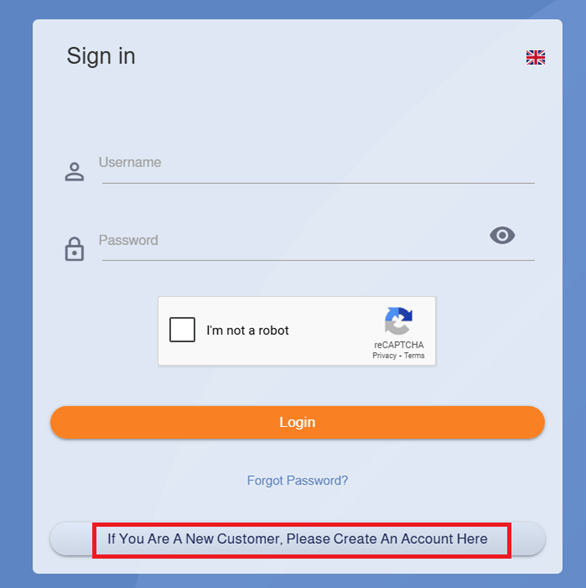
- Go to the link: https://portal.taqnyat.sa/
- Click on the option: “If you are a new customer, please create an account here.”
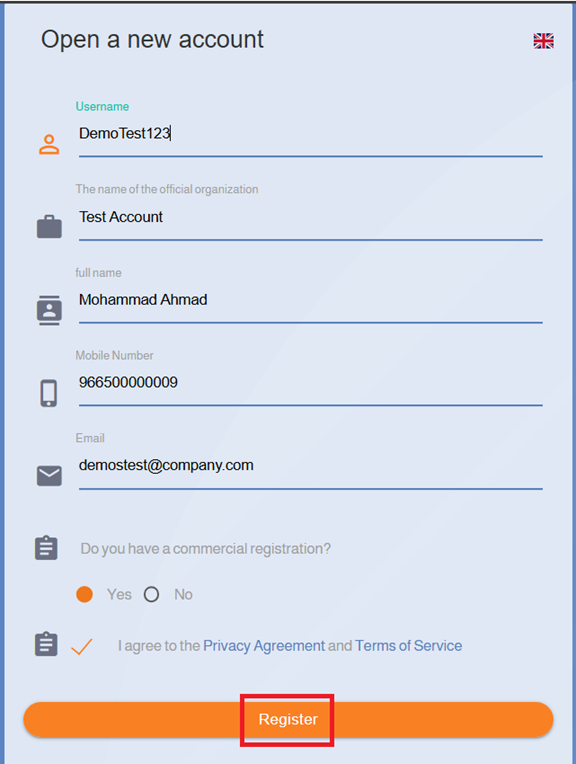
- Fill in the required fields, then click “Register.”
Once registration is complete, you will receive 7 free messages. You can try the service using the trial sender name: Taqnyat.sa
The message will be delivered with a fixed demo text.
To verify your account and register your own sender name, please refer to the following:
Requirements for Account Verification and Sender Name Registration Request
First: Private Entities
Account Verification Requirements:
- Fill in, sign, and stamp the contract.
- If the entity is subject to VAT, attach the VAT certificate
New Sender Name Registration Requirements:
- Fill in the sender name authorization form and authenticate it through the Chamber of Commerce.
- A copy of the valid commercial registration certificate. The expiry date must be at least 30 days away.
- If there is no clear relation between the sender name and the entity name, attach a supporting document, such as:
- The registration fee for a sender name is SAR 230, renewable annually.
o Trademark certificate
o Franchise certificate
o Agency registration certificate
o Domain registration certificate from a certified registrar https://nic.sa/ar/registrars
o Investment license from the Ministry of Investment
o Classification certificate from the Saudi Authority for Intellectual Property
o Membership certificate from the Chamber of Commerce
Requirements for a Sender Name Already Registered with Another Service Provider and Still Valid:
- • Fill in, sign, and stamp the Proof of Contract.
Second: Government Entities
Account Verification Requirements:
- Fill in, sign, and stamp the contract.
- If the entity is subject to VAT, attach the VAT certificate.
New Sender Name Registration Requirements:
- Fill in, sign, and stamp the sender name authorization form.
- The sender name must be related to the entity name. If not, attach a supporting document clarifying the relation.
- The registration fee for a sender name is SAR 230, renewable annually.
Requirements for a Sender Name Already Registered with Another Service Provider and Still Valid:
- Fill in, sign, and stamp the Proof of Contract.
Third: Charity Organizations
Account Verification Requirements:
- Fill in, sign, and stamp the contract.
- If the entity is subject to VAT, attach the VAT certificate.
New Sender Name Registration Requirements:
- Fill in, sign, and stamp the sender name authorization form.
- A valid registration certificate from the Ministry of Human Resources and Social Development.
- The sender name must be related to the entity name. If not, attach a supporting document clarifying the relation.
- The registration fee for a sender name is SAR 230, renewable annually.
Requirements for a Sender Name Already Registered with Another Service Provider and Still Valid:
- Fill in, sign, and stamp the Proof of Contract.
Fourth: Freelancers
Account Verification Requirements:
- Fill in and sign the contract.
- If applicable, attach the VAT certificate.
New Sender Name Registration Requirements:
- Fill in and sign the sender name authorization form.
- A copy of the valid freelancer certificate.
- A supporting document for the sender name, such as:
- 4. The registration fee for a sender name is SAR 230, renewable annually.
o Trademark certificate
o Franchise certificate
o Agency registration certificate
o Domain registration certificate from a certified registrar https://nic.sa/ar/registrars
o Investment license from the Ministry of Investment
o Classification certificate from the Saudi Authority for Intellectual Property
o Membership certificate from the Chamber of Commerce
Requirements for a Sender Name Already Registered with Another Service Provider and Still Valid:
- Fill in and sign the Proof of Contract.
How to Request a Sender Name:
- Log in to your account via: https://www.taqnyat.sa
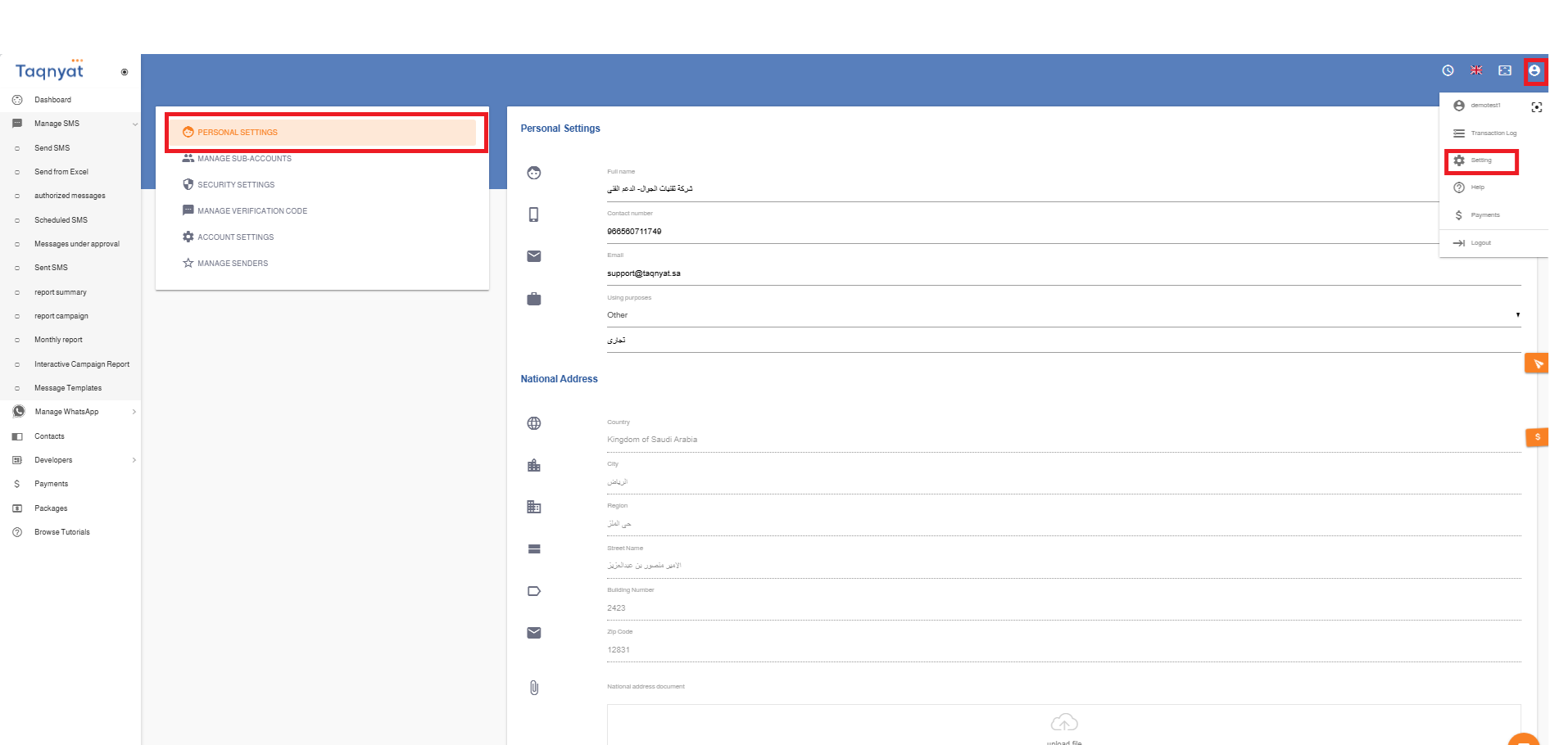
- Go to “Settings”.
- Select “Sender Name Management”.
- Click on the + icon.
- Enter the sender name and the required details in the form.
- Upload the required documents for sender name registration.
- Submit the request.
To recharge your message balance, you can view the packages and prices through:
SMS Text Message Packages Details - Taqnyat Platform
Reference Image:
Account Activation
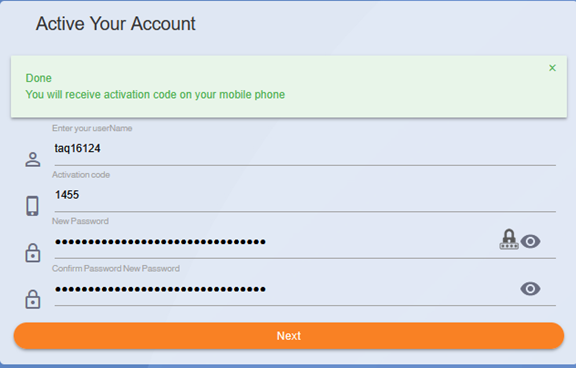
To activate your account, please follow these steps:
- Click on the activation link sent to you via your registered mobile number and email address.
- Once the page opens, you will see your username. Activate the “I’m not a robot” option, then click “Next.”
- Enter the verification code sent to your registered mobile phone.
-
Next, create a strong password. The password must include uppercase and lowercase letters, numbers, and symbols, and be at least 12 characters long. Then click “Next” to complete the activation process. You can click the icon
Re-enable
 to allow the system to automatically generate a suitable password for you
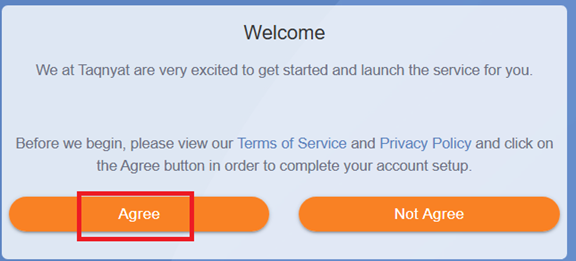
- Review and accept the Terms of Service and Privacy Policy.
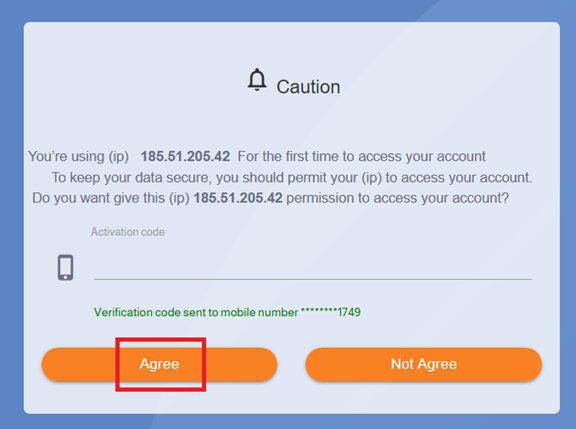
- You will receive an additional verification code to approve adding your server’s IP address to the whitelist. Please enter the code and click “Approve” to finalize the activation.
After activating your account, you will be able to log in using your username and the password you set. You can then register your sender name and recharge your balance. .
Reference Image :
Logging into Your Account
You can access your account on our website by following these steps:
- Go to the link https://portal.taqnyat.sa/
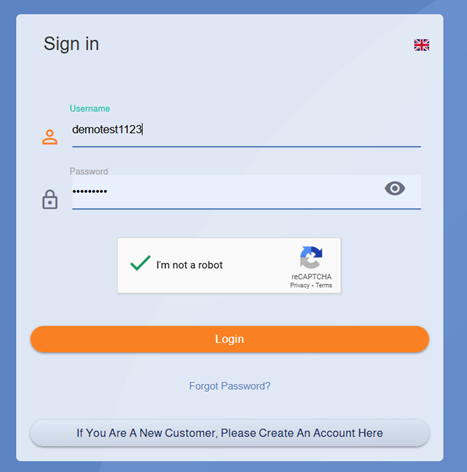
- Enter your username and password
- Select the “I’m not a robot” option, then click “Log In.”
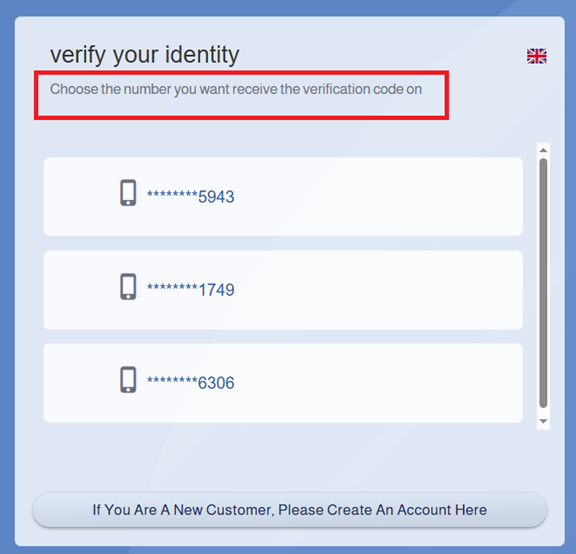
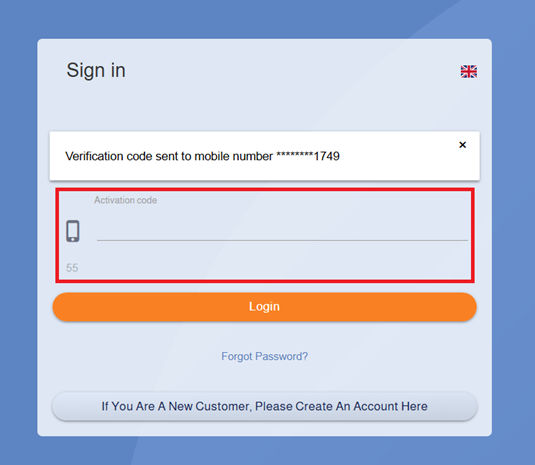
- A list of available phone numbers will appear for you to choose where to receive the verification code.
- Enter the code sent to the selected number, then click “Log In.”
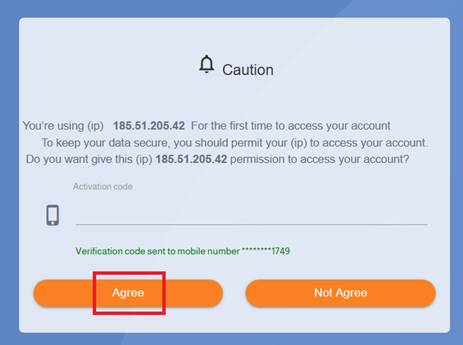
- If the IP address you are using is not added to the whitelist, you will receive an additional verification code that must be entered to successfully complete the login process.
Reference Image:
Resetting Your Password
You can easily reset your password by following these steps:
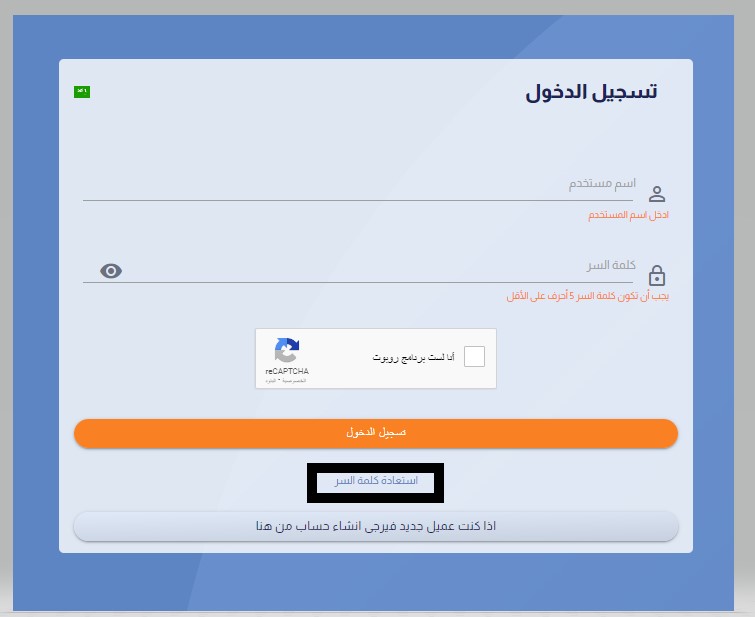
- Go to the link https://portal.taqnyat.sa/
- Click on the “Forgot Password” option.
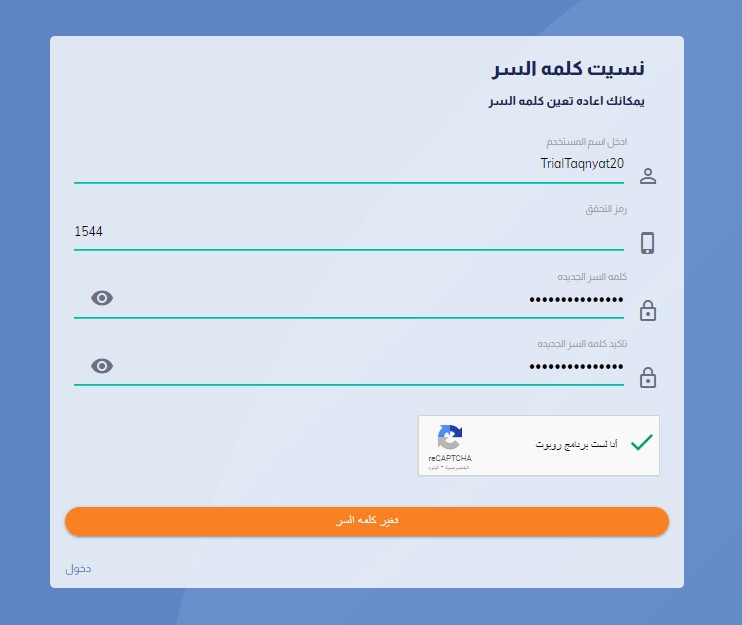
- Enter your username.
- Select “I’m not a robot” and then click “Send.”
- Enter the two-factor verification code sent to the mobile number registered with your account.
-
Next, enter a strong password. The password must include uppercase and lowercase letters, numbers, and symbols, and be at least 12 characters long. You can click the icon
Re-enable
to allow the system to automatically generate a suitable password for you
- Select “I’m not a robot” again, then click “Change Password” to complete the process.
Reference Image:
Managing Verification Code
Verification Code Management
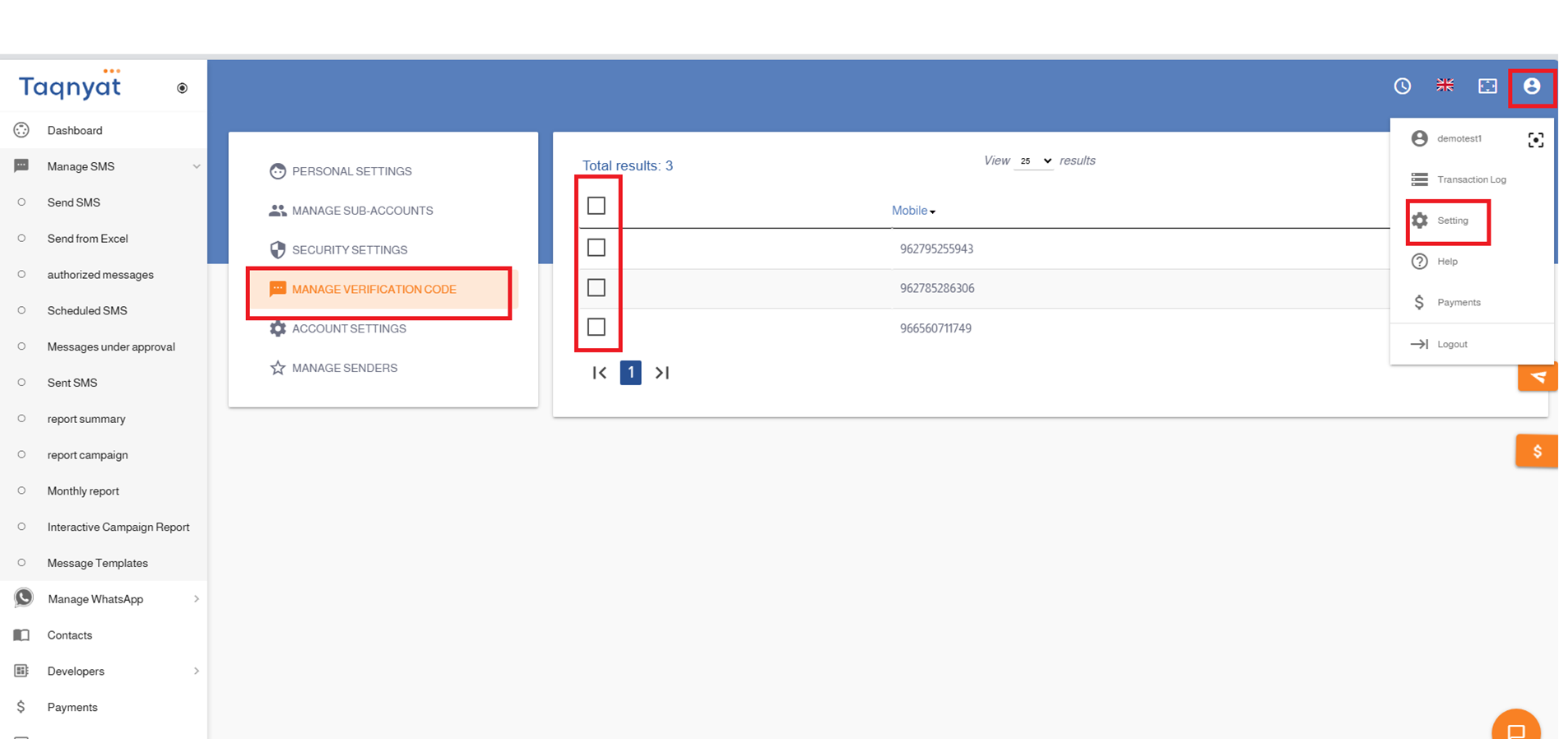
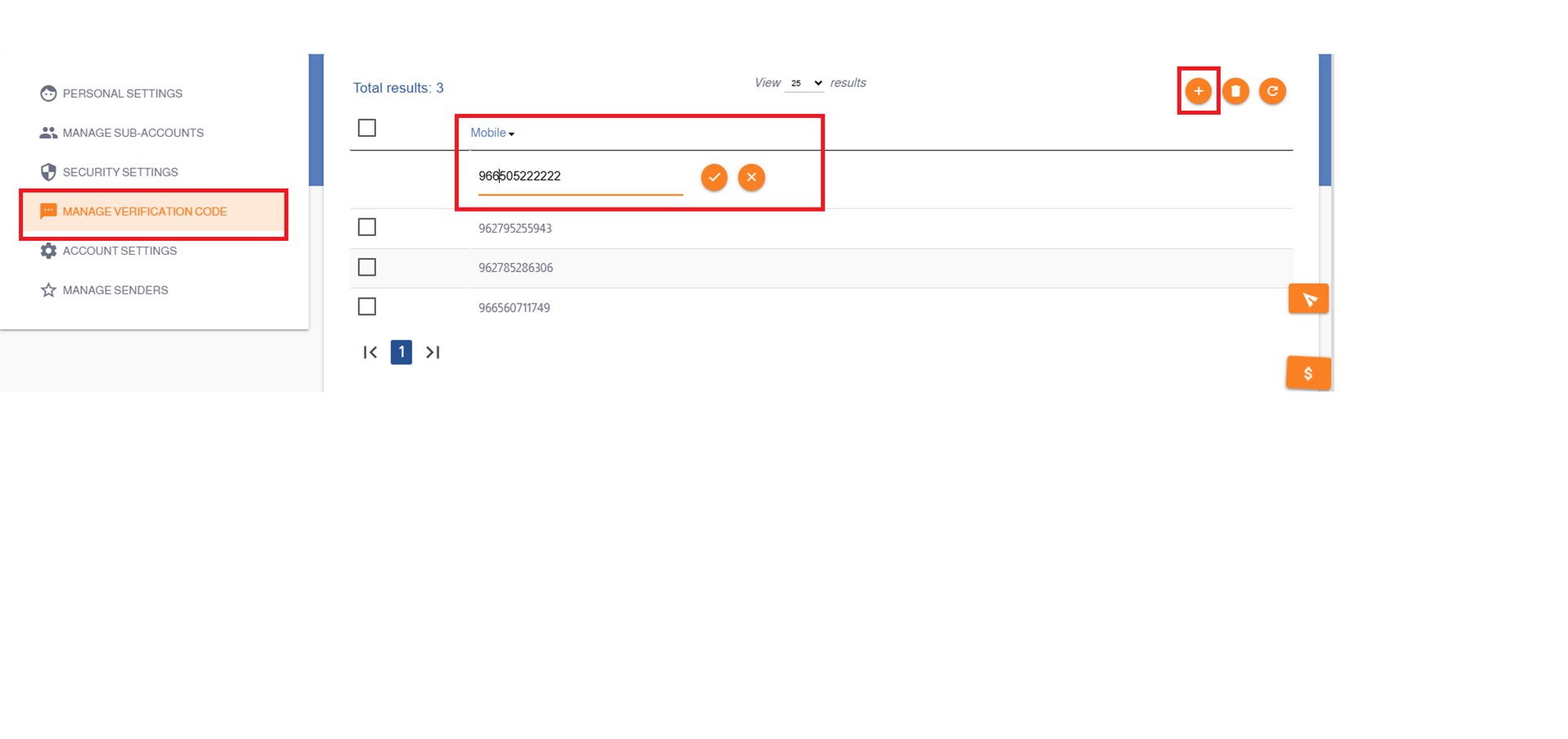
You can add an unlimited number of mobile numbers as approved numbers for your account. When logging into the website, you can select which approved mobile number will receive the verification code.
To add an approved mobile number, please follow these steps:
- Log in to your account via the link: https://www.taqnyat.sa
- Select Settings.
- Choose Verification Code Management.
- To add a new approved number, click the + icon.
- To delete an approved number, select the number and click the delete icon.
Note: It is not possible to disable or cancel the verification code feature when logging into the account.
Reference Image:
Personal Information
In the Personal Information section, the official entity name and registered contact details are displayed as the approved data for your account. You can manage and update this information.
- Log in via the link: https://portal.taqnyat.sa/
- Select Settings.
- Choose Personal Information.
- Edit the desired fields, then click Update to complete the process.
Reference Image: