|
✦ New Updates – April 2026
|
|
|
Discover What's New in LiveChat
|
|
Smarter · Faster · More Powerful
|
|
We're excited to introduce a set of new LiveChat updates designed to make your daily operations smoother, faster, and more efficient. These improvements focus on helping your team respond quicker, stay organized, and deliver a better customer experience.
|
|
📋 Smarter Chat Management
|
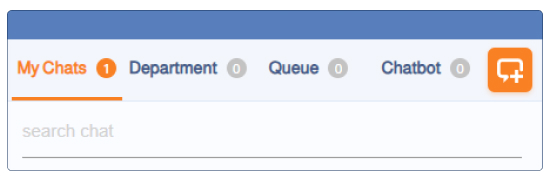
Managing conversations just got simpler, clearer, and more organized. With the new LiveChat interface, you can now navigate your chats through dedicated tabs:
|
My Chats – Instantly access all conversations assigned to you, so you stay focused and responsive.
|
|
Department – Supervisors can view all ongoing conversations within the department for better visibility and team coordination.
|
|
Queue – Track unassigned chats to reduce response time and never miss a customer.
|
|
Chatbot – Monitor conversations currently handled by the chatbot before transfer or closure.
|
|
Start New Chat (+) – Add a number, choose a template, and start the conversation instantly. It will be auto-assigned to you in My Chats.
|
|
✅ What this means for you: Less confusion, faster responses, and a better customer experience.
|
|
|
|
👁️ More Visibility, Better Control
|
|
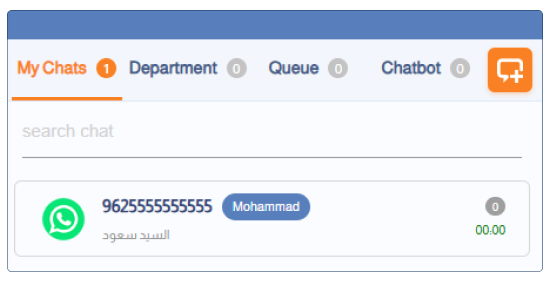
Customer Name + Number Together – Both name and phone number are visible in the chat list, with the ability to edit anytime.
|
|
Smart Waiting Timer – A timer on each chat shows how long it's been since the last agent response.
|
|
✅ What this means for you: Instantly identify customers and prioritize conversations that need your attention most.
|
|
|
|
⚡ Faster Replies, Unified Communication
|
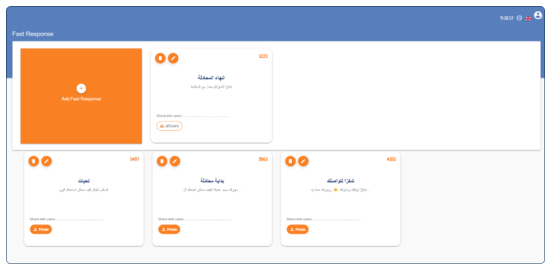
With the enhanced Fast Response feature, you can create ready-made replies and share them across your team:
|
Create and Organize Replies – Save frequently used responses and access them instantly during a chat.
|
|
Share with Your Team – Share responses with all agents or specific users to unify communication across your team.
|
|
Attach Files (Images / PDFs) – Attach files directly to your responses for clearer and more effective communication.
|
|
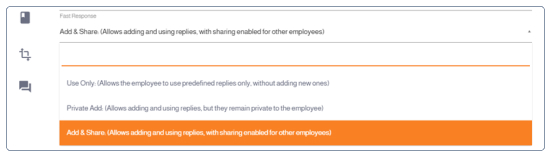
Flexible Access Control (Admin Settings) – Use Only / Private Add / Add & Share.
|
|
✅ What this means for you: Faster replies, consistent messaging, and a more professional customer experience across your entire team.
|
|
|
|
🔔 Flexible Access Control (Admin Settings)
|
From the admin portal, you can control how agents use this feature:
|
Use Only: Agents can only use predefined responses
|
|
Private Add: Agents can create their own private replies
|
|
Add & Share: Agents can create and share responses with others
|
|
|
🔔 Stay Notified, Your Way
|
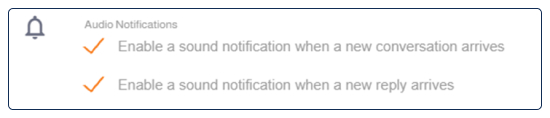
From the LiveChat settings, you can easily enable or disable sound notifications based on your preference:
|
New Message Notification – Get alerted when a new conversation starts, so you never miss a new customer.
|
|
New Reply Notification – Receive a sound alert when a customer replies within an ongoing chat.
|
|
✅ What this means for you: Stay focused when needed, stay alerted when it matters, and have full control over your work experience.
|
|
|
|
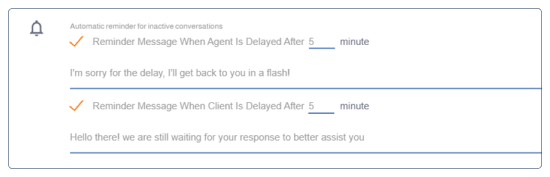
With the new Auto Reminder for Inactive Chats, you can ensure that no conversation is left unattended:
|
If the agent is delayed – a message is automatically sent to reassure the customer.
|
|
If the customer is delayed – a follow-up message is sent to re-engage them.
|
|
Fully Customizable Messages – Personalize the reminder messages to match your tone and communication style.
|
|
✅ What this means for you: Your customers feel acknowledged, your team stays responsive, and no conversation falls through the cracks.
|
|
|
|
⚠️ Smart Tip: Keep Your Chats Organized
|
To ensure a smooth workflow and avoid missed conversations, we recommend setting up automatic chat closure:
|
Manual Closure – Agents can close chats manually when the conversation is completed.
|
|
Automatic Closure (1–24 hours) – Set a time for chats to be automatically closed after inactivity.
|
|
Important for Chatbot Users: If a chat remains open and the customer sends a new message, the chatbot will not respond, which may interrupt the experience.
|
|
💡 Pro Tip:
You can ask our support team to configure a message before chat closure, such as: "It seems this chat has been inactive. If you still need help, please contact us again."
|
|
|
🔐 Stay Logged In, Stay Productive
|
LiveChat will now stay active throughout your working hours, so you do not have to log in multiple times a day:
|
Full Workday Session – Stay logged in unless you choose to log out manually.
|
|
Control Logout Behavior – From settings, disable the "Log out when IP changes" option.
|
|
✅ What this means for you: Less disruption, smoother workflow, and more time focused on your customers.
|

|
|
|
📊 Measure and Improve Your Customer Experience
|
If you are a Supervisor with dashboard access, you can benefit from a dedicated Chat Evaluation Table:
|
Complete Evaluation Overview – Customer name, rating, feedback, assigned agent, and chat closure status.
|
|
Automatic Evaluation Messages – Activate automatic rating requests sent after chats are closed.
|
|
Flexible Evaluation Triggers – After the agent closes the chat, or after a full journey (chatbot + agent).
|
|
✅ What this means for you: Clear visibility into performance, better understanding of customer satisfaction, and continuous improvement for your team.
|

|
|
|
These updates are designed to help you work smarter,
respond faster, and deliver a better customer experience every day.
If you would like help activating any feature or learning more, our team is always here to support you.
|
|
|